The free beta is open — join now and lock in founding-member pricing for life.
Free beta · now open

The Operating System your MSP runs on.

Knowledge, projects, tickets, clients, quotes, and tech-stack health — one system where your whole team works, not a dozen disconnected tabs.

MSP OS isn’t another wiki bolted onto your service desk. It’s the operating layer for a managed service provider — capture SOPs, run TrackIT projects and tasks, manage clients, score stack health, send quotes, and feed an AI-ready knowledge layer your agents actually call.

Free during beta No card required Founding pricing for life

mspos.app/kb/firewall-failover-sop
Watch · Knowledge articleLive in the beta
MSPOS

Built for AI agents first, humans second.

MSP OS is the operating system for modern MSPs. Every module, every workflow, every data point — ready for AI agents and built to help your team move faster.

  • Agent-native by design
  • One data layer. All modules.
  • Practical for humans. Powerful for AI.
AI Agents

Autonomous. Context-aware. Always on.

Human Techs

Clear workspace. Complete context.

Agent-ready API + MCP

Unified access for AI agents across your tools and data.

Agent-native
Structured MSP OS Data Layer
DocsTicketsAssetsScriptsQuotesClients

Knowledge Base

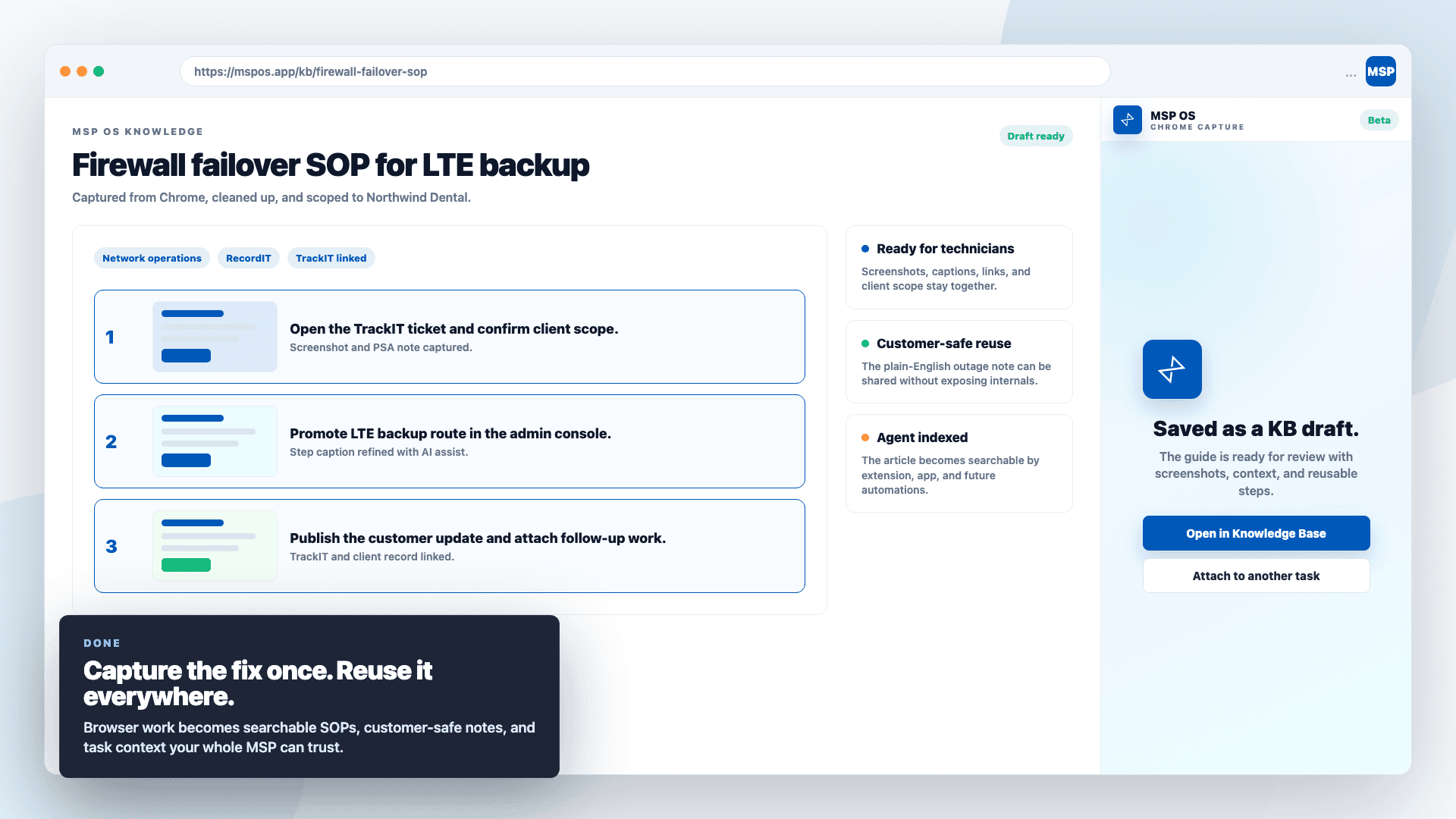
Structured SOPs, captured in clicks with a Scribe-style browser extension.

Live

Client Monitoring

Assets, security, backups, and network health in one live view.

Live

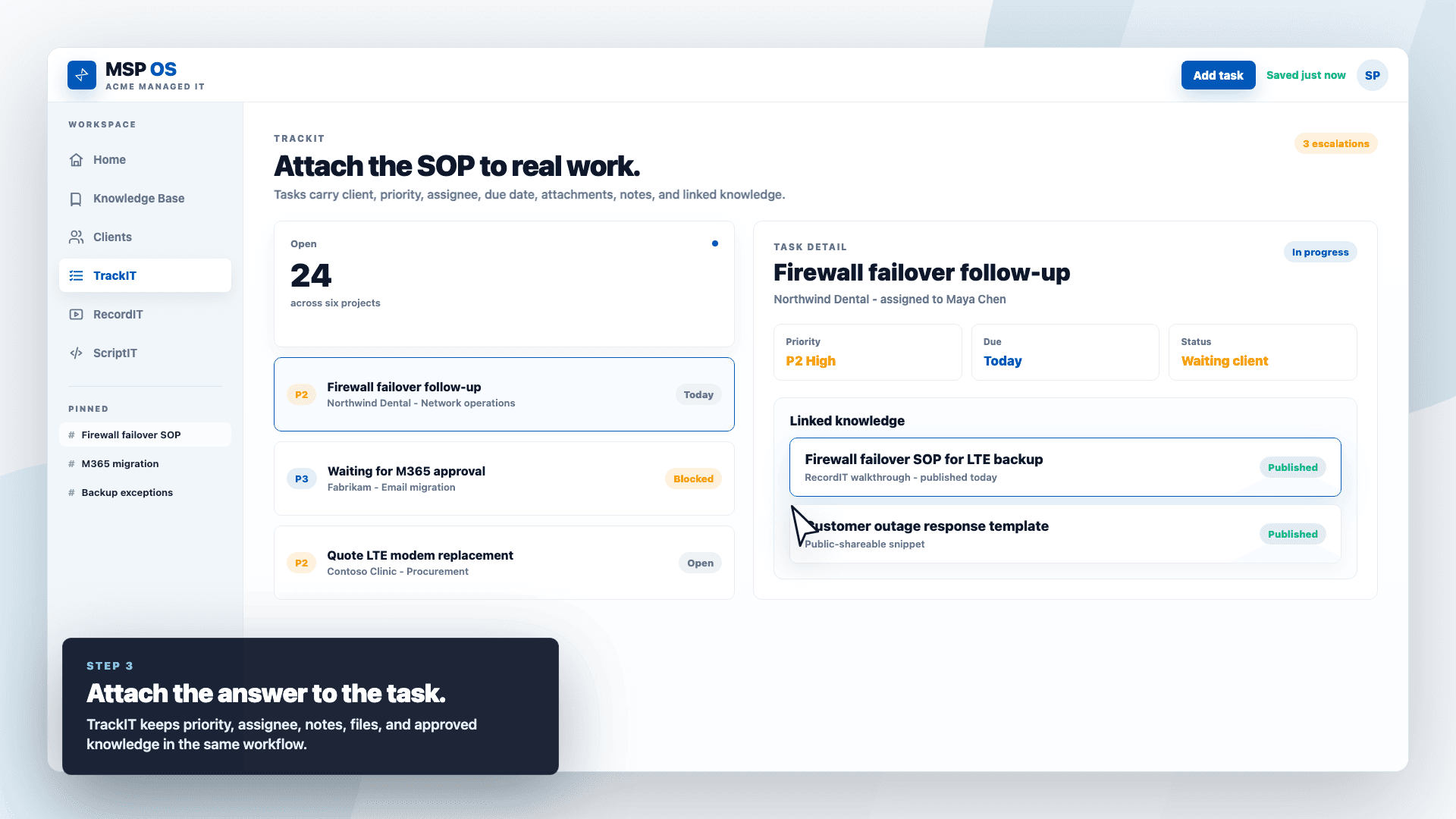
TrackIT

Tasks and projects that keep service work moving — with linked KB.

Live

RecordIT

Loom-style screen recording for fast walkthroughs and handoffs.

Live

ScriptIT

A shared library for PowerShell and automation scripts.

Live

QuoteIT

Professional quotes from your PSA, with clean approval pages.

Live
On the roadmapComing soon
Coming soon

Finance

An owner & CFO dashboard — income, expenses, and profit margin by client at a glance. No more digging through QuickBooks or Xero to see how the business is really doing.

Income by clientExpensesProfit marginCash flow at a glance

Beta testers get it first

Integrations

Plug into the stack you already run.

MSP OS reads from the tools your service desk lives in — so customer data, security posture, backups, and network health show up where the work happens, not in another dashboard you have to remember to check.

Syncro logoPSA · RMM

Syncro

Your PSA/RMM becomes the system of record. MSP OS syncs customers, assets, software inventory, and your product catalog — automatically.

  • Customer records
  • Assets & warranty
  • Installed software
  • Product catalog
PowersClients & QuoteIT
Dropsuite logoBackup

Dropsuite

Backup coverage feeds the Tech Stack Health module, scoring exactly how protected each client’s users really are.

  • Per-user backup status
  • Last backup time
  • Storage used
  • Coverage score
PowersTech Stack Health
Huntress logoSecurity · EDR / ITDR / SAT

Huntress

EDR, ITDR, and Security Awareness Training roll up into one security posture score across every client’s stack.

  • EDR agent coverage
  • ITDR identity risk
  • MFA enablement
  • SAT learners
PowersTech Stack Health
Microsoft Entra ID logoIdentity · SSO

Microsoft Entra ID

Enterprise SSO with SAML and group-based roles for your team — plus visibility into each client employee’s MFA status.

  • SAML single sign-on
  • Group → role mapping
  • JIT provisioning
  • Client MFA status
PowersAuthentication & Clients
Slack logoNotifications

Slack

TrackIT pings the right tech the moment work lands — with daily open/overdue reminders and team digests on the way.

  • Assignment DMs
  • Daily reminders
  • Team digests
  • Share to Slack
PowersTrackIT
Ubiquiti UniFi logoNetwork

Ubiquiti UniFi

A UniFi tab in client details surfaces firewall and gateway health, WAN uptime, and ISP metrics straight from Site Manager.

  • Gateway & device health
  • WAN uptime
  • ISP metrics
  • Critical alerts
PowersClients
Hudu logoDocumentation · KB

Hudu

Moving off Hudu? Bring everything with you — KB articles, client data, and documentation migrate into MSP OS so nothing starts from scratch.

  • KB articles
  • Client records
  • Documentation
  • Full data migration
PowersKB & ClientsComing soon
SuperOps logoPSA · RMM

SuperOps

Run SuperOps instead of Syncro? Same deal — your PSA/RMM stays the system of record while MSP OS syncs customers, assets, and your catalog.

  • Customer records
  • Assets & warranty
  • Installed software
  • Product catalog
PowersClients & QuoteITComing soon

More integrations land throughout the beta — your wish list shapes what we build next. Hover to pause and read any card.

The cost of tribal knowledge

You already know this pain. MSP OS is the fix.

Without MSP OS

  • The fix lives in one senior tech’s head — and they’re on PTO.
  • Six tabs open just to answer one ticket.
  • The SOP is three versions out of date, if it exists at all.
  • Approvals bounce back and forth over email for days.
  • Your AI tools answer from Google, not from how you actually do it.

With MSP OS

  • Every fix written down once, reachable by the whole team.
  • Knowledge, tickets, quotes, and clients on one surface.
  • Structured articles with owners, status, and customer-safe links.
  • Clean approval pages that never leak internal notes.
  • Agents that answer straight from your knowledge layer.
Surface

Built for teams that run on tools, not tabs.

The product already spans the app, browser extension, public approval links, iOS API routes, Syncro product sync, and token-based access. Beta feedback decides which workflows get sharpened first.

  • Tenant isolation
  • MFA-ready login
  • Audit logging
  • Public share links
  • Browser & iOS
  • API tokens
  • Extension capture
  • Task-linked KB
From browser to knowledge

Capture the fix where it happens. Reuse it everywhere it matters.

The MSP OS browser extension turns the screen in front of your technician — a Syncro ticket, a vendor portal, a remote session — into a structured article that lives in your knowledge layer and gets called by your agents.

  1. 01

    Capture what just happened.

    Turn a field fix, onboarding path, migration rollback, or browser workflow into a reusable article before the details disappear.

  2. 02

    Attach it to real service work.

    Organize by client, collection, owner, status, quote, task, or project so the article is bound to the work it supports.

  3. 03

    Make the answer reachable everywhere.

    Technicians search in the app, agents call the knowledge layer, and customers receive controlled public links or quote approvals.

Chrome·MSP OS extension
Watch · Browser captureBeta-ready
Free during beta · now open

Help shape the MSP OS your team would actually use.

We are looking for testers who will bring real service-desk pressure: messy documentation, recurring client fixes, technician handoffs, approvals, AI search experiments, and integration wish lists. It is free for the whole beta — and the feedback you give shapes what ships.

Good fit if you are
  • MSP owners still leaning on senior-tech memory
  • Service managers standardizing recurring fixes
  • Technicians who need the answer inside the ticket motion
  • Teams testing AI agents, MCP tools, or browser capture